

Cell Phones on Cruise Ships: Stay Connected Without Breaking the Bank
Dreaming of a perfect cruise vacation? Imagine breathtaking sunsets, delicious food, and exciting adventures in exotic ports. But before you set sail, figuring out how to use your cell phone on a cruise ship without breaking the bank can be tricky. That’s where this guide comes in!
This is your one-stop resource for navigating the sometimes confusing world of cell phone use on cruise ships. Whether you’re a seasoned sailor or a first-timer, this guide will help you make informed decisions about using your cell phone onboard and during shore excursions.
We’ll unlock the secrets of using onboard Wi-Fi, explore cost-effective options for staying connected while exploring ports of call, and show you how to avoid hidden fees. With this guide, you’ll be a cell phone on cruise ships pro, allowing you to focus on enjoying your vacation instead of worrying about outrageous phone bills.
So, pack your swimsuit, sunscreen, and this essential guide. Get ready for a smooth sailing experience where staying connected enhances your journey, not complicates it. Bon voyage!
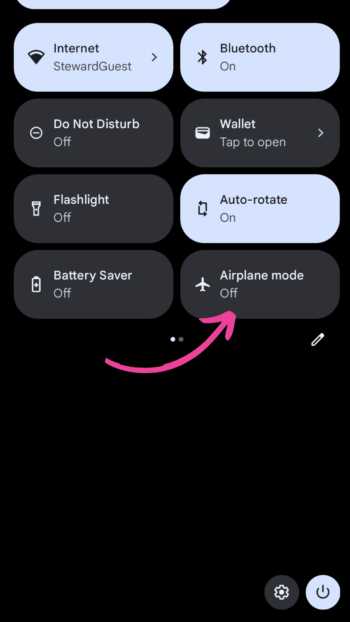
Conquer Connectivity Costs: Download Paradise, Embrace Airplane Mode
Ditch the expensive Wi-Fi and cruise into offline bliss! Pre-load your phone with maps, music, ebooks, and even shows – all from your personal library. It’s free, convenient, and shields you from roaming charges. Plus, airplane mode is your ocean buddy: activate it for an instant battery boost and to prevent data usage. Now, dive into your curated digital oasis and savor a worry-free cruise!
Forget mermaids and pirates, the real sea monster on your cruise can be unexpected phone charges! Cruise lines charge extra for both onboard cellular service and Wi-Fi. Plan ahead with this guide to avoid post-vacation bill shock and ensure smooth sailing, not sticker shock.
Still need help turning your phone to airplane mode,? Watch this Video: How to turn Airplane mode on and off on Android
Staying Connected at Sea: A Guide to Cruise Ship Wi-Fi Plans
Staying connected at sea is essential for many cruisers. Cruise ship Wi-Fi offers a lifeline for work emails, social media, or entertainment. Especially on relaxing sea days, staying connected can be essential for checking emails, sharing photos [link to photographing sea days section], or simply browsing the web
Snag the best deals pre-cruise
Most cruise lines offer discounted Wi-Fi packages when purchased before you set sail. So, plan and save:
- Royal Caribbean: Voom up your cruise with their tiered plans, from basic social media access to streaming-friendly options. Check out their current offerings and prices: https://www.royalcaribbean.com/booked/cruise-ship-wifi
- Carnival Cruise Lines offers three different plans. A Social plan that gets you connected to the most popular social media websites, a Value Plan, and a Premium Plan. https://www.carnival.com/internet-plans
- Norwegian Cruise Line: NCL’s Freestyle Wi-Fi packages cater to various data needs, including social media, browsing, and even streaming for larger groups. See their plans and compare prices here: https://www.ncl.com/onboard-packages/internet-packages
- MSC Cruises: Stay connected with MSC’s Connect packages, ranging from limited browsing to unlimited surfing and streaming. Explore their options and pricing: https://www.msccruises.com/int/on-board/internet-and-apps/wifi
- Princess Cruises: Princess MedallionNet offers varying data packages and even includes streaming options in their premium plans. Browse their plans and prices: https://www.princess.com/en-us/ships-and-experience/princess-medallionclass/medallionnet
- Virgin Voyages: Virgin offers a unique Wi-Fi approach, including a complimentary basic package for messaging and social media, with upgrades available for heavier data usage. Learn more about their plans here: https://www.virginvoyages.com/help-and-support/the-days-at-sea/sailor-services
Bonus Tip: Some cruise lines offer bundle deals that combine Wi-Fi packages with drink packages or shore excursions. Consider your needs and compare prices before purchasing.
Staying connected Onboard Last minute options
Didn’t pre-purchase a plan? Fear not! Most cruise lines allow you to buy packages onboard, though prices may be slightly higher. Simply connect to the ship’s Wi-Fi, access the internet portal, and choose the plan that suits your needs.
Pro Tip: If you only need occasional internet access, some cruise lines offer pay-as-you-go options, charging by the minute.
Remember:
- Connection Speeds: Speeds can vary depending on the cruise line, ship, and your location at sea. Expect slower speeds than on land, especially in remote areas.
- Number of Devices: Some plans limit the number of devices you can connect simultaneously. Check the details before purchasing.
- Fair Usage Policy: Cruise lines may have data limits or fair usage policies in place to prevent network congestion.
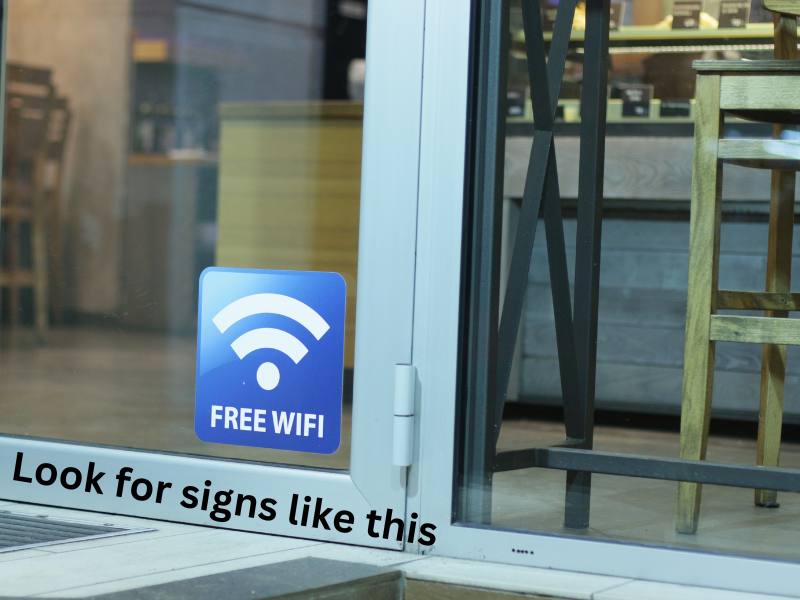
Stay Connected in Ports: Ditch the Scramble
Don’t scramble for the internet in ports! Avoid expensive cafes and confusing SIM cards with these smart tips:
- Explore Your Phone Plan: Before your cruise, check if your existing phone plan offers coverage in your ports of call. You might already have roaming included, saving you money and hassle.
- Consider Temporary Add-Ons: If your plan doesn’t cover international data, explore temporary add-ons for specific ports. These are like mini-internet boosters perfect for shorter stays.
- Download Maps and Essentials: For peace of mind, download offline maps and essential information before arriving in port.
Bonus Tip: Consider a travel eSIM card for extended stays or frequent international travel.
Cellphone Carriers & International Coverage
T-Mobile: Treasure map for T-Mobile freedom: https://www.t-mobile.com/cell-phone-plans/international-roaming-plans
Other Carriers: Check international coverage info from these providers:
- AT&T: https://www.att.com/international/canada-roaming/
- Verizon: https://www.verizon.com/plans/international/international-travel/
- Sprint (merged with T-Mobile): Use the T-Mobile link above.
- Boost Mobile: https://www.boostmobile.com/international-services
- Cricket Wireless: https://www.cricketwireless.com/support/international-calling/international-features
What do these websites offer?
- International roaming plans: Call, text, and data allowances for specific countries/regions.
- Pay-as-you-go rates: Per-minute, text, or megabyte charges for international usage without a plan.
- Travel tips: General tips like turning off data roaming to avoid unexpected costs.
Remember: Review your plan details and contact your carrier before your cruise for any uncertainties.
Weighing Your Options: Find the Internet That Fits Your Budget
While cruise lines offer internet plans, compare prices and data limits carefully. These plans often don’t work in ports and might not be the best value compared to other options.
Remember, You’re in Charge!
Choose the internet solution that fits your needs and budget, just like a wise pirate picking the perfect treasure map! This could be your existing phone plan with international add-ons, a temporary travel eSIM card, or a combination of options depending on your itinerary and usage.
Embrace the Port’s Wireless Bounty
Many restaurants, cafes, and even public areas in ports offer free Wi-Fi, making them perfect spots to stay connected during port days. This can be especially helpful for essential tasks or quick photo uploads while saving your precious data for exploring away from the keyboard.
Finding Free Wi-Fi:
Several resources can help you locate free Wi-Fi hotspots in ports:
- Nomad List: This website caters to digital nomads and remote workers, and it includes a map of Wi-Fi hotspots in co-working spaces, cafes, and other locations around the world, including many popular cruise destinations.
- Apps: Consider using apps like OpenSignal, which showcases cellular network coverage globally and also highlights Wi-Fi hotspots in some areas.
Bonus Tip: Ask your fellow cruisers or research online forums for port-specific recommendations regarding free Wi-Fi hotspots.
Use your cell phone Offline:
Be Prepared for Anything
Before you set sail, download essential resources for a worry-free experience, even when Wi-Fi is limited. Think of it as having a trusty compass and map, ready to guide you through any “foggy internet conditions.“
- Download Offline Maps and Key Apps: Explore port destinations confidently with offline maps. Download key apps you might need like translation tools, ride-hailing services, or local restaurant guides.
Bonus Tips to Be a Tech-Savvy Traveler
- App Audit: Before you set sail, perform an “app checkup.” Disable apps you won’t be using to minimize data usage and battery drain. Think of it as throwing out extra anchors that weigh you down on your digital voyage.
- Data Detective: Be mindful of data-hungry activities like video calls and large downloads. Prioritize essential tasks and savor your precious data like shiny gold coins you don’t want to waste.
- Offline All-Star: Download offline capabilities for your favorite apps when available. This could include offline maps for navigation apps, translated content for language learning apps, or downloaded movies/shows for entertainment apps.
- App It Wisely: Choose apps with offline features whenever possible. Additionally, disable background data usage on all apps to prevent them from unintentionally consuming data. Let your phone be a helpful tool, not a data-hoarding kraken!
Video: His phone plan didn’t work on a cruise ship:
https://youtu.be/ofhgnEQ0HWA?si=0hhBsxum4_sCTcZZ
How to use airplane mode while on a cruise:
To avoid unwanted charges, keep your device in airplane mode when you’re not using voice, messaging or data services.
You can still connect to Wi-Fi (either via the ship’s connection or via free Wi-Fi connections in ports of call), but you won’t have to worry about accidentally making a pricey 5-minute pocket-dial.

Cell phones on cruise ships horror story:
Cruiser Hit With $1,498 Phone Bill
Molly dreamed of turquoise waters and sun-kissed decks, not a four-digit phone bill. Yet, that’s what awaited her after her cruise, thanks to a hidden monster lurking in the digital waters: Ocean roaming charges.
Like many, Molly assumed her “unlimited” data covered everything. Sadly, she hadn’t known about the treacherous tides of ship satellite providers, whose fees can sink any vacation budget faster than a rogue wave.
One innocent Instagram story from the deck, one quick Google search for the perfect snorkeling spot – each tap, swipe, and click racked up an unimaginable tab.
Remember, Molly’s experience isn’t an isolated incident. Her story is a cautionary tale whispered amongst seasoned cruisers, a reminder that vigilance is key.
Chart your course wisely, and let Molly’s misfortune be your compass, guiding you towards a smooth and stress-free voyage. Avoid her fate, and enjoy the sun-kissed decks, not the shadow of a monstrous phone bill.
For the full story of Molly’s experience, visit the Daily Mail article: [Worse things happen at sea.]
Molly’s story proves one thing: unchecked data at sea can be a financial kraken. So, before you set sail, let’s learn how to disable that data beast on your Android device! Let’s ensure your next cruise is filled with sunshine and serenity.

Avoid cruise cell phone horror bills:
How to turn off data on an Android cellphone
Here’s a general guide:
- Open the Settings app. This is usually accessible from the main app screen or by swiping down from the top of the screen and tapping the gear icon.
- Navigate to “Connections” or “Network & internet” depending on your phone model.
- Tap on “Mobile networks”.
- Disable “Mobile data”. This will turn off all data usage on your phone, including cellular data and Wi-Fi.
- Optionally, disable “Data roaming” if you want to specifically prevent your phone from accessing international data networks. Some devices might have this option directly under “Mobile networks”, while others might require navigating to “Advanced” or “Network operators”.
Additional cruise cellphone tips:
- You can also access quick settings for mobile data and roaming by swiping down twice from the top of the screen and tapping the corresponding icons (two arrows for data, and a globe with an “R” for roaming).
- Some phone models might have dedicated toggles for “Airplane mode” which automatically disables all wireless connections, including cellular data and roaming.
- Consider using apps like “NetGuard” or “GlassWire” to monitor your data usage and prevent accidental roaming charges.
- For more help managing your mobile data usage check out this article from Google: https://support.google.com/fi/answer/9458407?hl=en
Free Calling Apps:
- Facebook Messenger: – Familiar messaging platform with free voice and video calls. Great for connecting with friends and family already using Messenger.
- Google Duo: – Simple and user-friendly, ideal for high-quality video calls. Perfect for face-to-face connections with loved ones back home.
- Telegram: – Secure messaging app with free voice and video calls for up to 1,000 participants! Features group chats, bots, and channels for diverse content.
- Viber: – Similar to WhatsApp, Viber offers free voice and video calls over Wi-Fi or data. It also has messaging features, group chats, and file sharing.
- WhatsApp: – Popular messaging app with free voice and video calls. A familiar choice for many users, ideal for those already comfortable with the platform.
Remember, the ideal app will depend on your needs and preferences. Consider factors like user base, desired features, and ease of use to make your choice.
Choosing the Right Wi-Fi App:
The best app for you will depend on your needs and preferences. Consider factors like:
Cost: Do you want a free app or are you willing to pay for additional features?
Features: Do you need video calling, group calls, or international calling?
User base: Do your friends and family already use the app?
Ease of use: Is the app simple and intuitive to use, especially for less tech-savvy users?
Pro Tip: Download and test out your chosen app before your cruise to ensure it works smoothly on your device and with your specific Wi-Fi connection.
Free Wi-Fi Calling Apps for Your Cruise:
A Comparison
| App | Cost | Features | User Base | Ease of Use | Pros | Cons |
|---|---|---|---|---|---|---|
| Facebook Messenger | Free | Voice & Video Calls, Messaging, Group Chats, Stories | Huge | Familiarity, Multi-functionality | Ads, Data-hungry in features | |
| Google Duo | Free | High-quality Video Calls, Simple Interface | Moderate | Minimalist, Excellent Video | Limited Features, No Messaging | |
| Telegram | Free | Voice & Video Calls (up to 1,000!), Messaging, Group Chats, Bots, Channels | Growing | Feature-rich, Secure | Large app size, Steeper learning curve | |
| Viber | Free | Voice & Video Calls, Messaging, Group Chats, File Sharing | Moderate | WhatsApp-like experience, File sharing | Less familiar, May require data for specific features | |
| Free | Voice & Video Calls, Messaging, Group Chats, Status Updates | Massive | Universal, Established Platform | Limited to 8-person video calls, Occasional spam/privacy concerns |

Cell phones at sea: Connect and Disconnect.Find Your Balance
Share your adventures with loved ones, but also embrace the power of unplugging. Disconnect to reconnect with yourself and the beauty around you. Think of it as taking a break from the pirate ship of the internet and enjoying the sunny beach of life.
We live in a world obsessed with documenting, sharing, and validating. But sometimes, the most precious moments are the ones whispered not on keyboards, but in the rustle of palm leaves, the warmth of family embrace, the silent awe of a breathtaking vista. My cruise became a wake-up call, a reminder that true magic resides in savoring the present, not broadcasting it. It’s a lesson I carry with me, hoping to trade likes for heartbeats, stories for memories, and the fleeting perfection of online fame for the enduring beauty of lived experience.
What will you choose to disconnect from and reconnect with on your next adventure?
~ Kristina, founder of Gallivanting Souls
Ditch the cruise cell phone Stress:
Pin your perfect Cruise Connection✨
📌Don’t let cell phone woes disrupt your cruise bliss! Pin this guide for worry-free phone use – cost-effective tips, Wi-Fi hacks & smart settings to avoid roaming charges. Stay connected, share adventures, & enjoy the ocean breeze! #CruiseConnect #SeamlessSailing #PhonePeace


Using your cell phone on your cruise FAQs:
1. Can I use my phone at all on a cruise?
Yes, you can use your phone on a cruise, but there are two main ways to do so: using the ship’s cellular service (which can be expensive) or connecting to the ship’s Wi-Fi (generally more affordable).
2. Which is cheaper, the ship’s cellular service or Wi-Fi?
Wi-Fi is almost always the cheaper option. Cellular service on ships is considered international roaming and can incur hefty charges, even for basic calls and texts. Wi-Fi plans, while not free, usually offer tiered packages for different needs and budgets.
3. Can I use my phone in airplane mode on a cruise?
It’s best to turn on airplane mode before you leave port to avoid accidental roaming charges.
Wi-Fi FAQs:
4. How much does the ship’s Wi-Fi cost?
Prices vary depending on the cruise line and specific package you choose. Generally, plans range from around $10-$25 per day, with higher tiers offering faster speeds and streaming capabilities.
5. Can I make calls and send texts with the ship’s Wi-Fi?
Yes, you can use apps like WhatsApp, Viber, or FaceTime to make calls and send texts over Wi-Fi for free. Regular phone calls and texts through your carrier may still incur roaming charges.
6. Can I stream videos on the ship’s Wi-Fi?
Some cruise lines offer Wi-Fi packages with streaming capabilities, such as Royal Caribbean’s “Surf + Stream” plan. However, basic Wi-Fi packages may not support streaming due to bandwidth limitations.
Port of Call FAQs:
7. Can I use my phone in port without incurring roaming charges?
It depends on your phone plan and where you’re cruising. If you’re in a popular cruise destination like the Bahamas or Caribbean, many cell phone providers offer affordable short-term international plans for calls, texts, and data.
8. Can I get free Wi-Fi in ports of call?
Some ports offer free Wi-Fi in public areas like shops and restaurants. You can also check if your cruise line extends its Wi-Fi service to certain private islands or ports.
9. Should I get a local SIM card in port?
If you’re planning to use your phone extensively in specific port cities, a local SIM card might be a budget-friendly option. However, consider the hassle of switching SIM cards and potential compatibility issues before opting for this route.